
Change, set or remove your password
Open your settings and choose Security and access. The Password section shows what applies to your account: a form to change it, a form to set one, or a way to remove it. Each change asks you to confirm it is you first, with your password, a passkey or a link Monica emails you, and after that Monica leaves you alone for three hours by default.
Choose one you use nowhere else. A long password is better than a complicated one.
Change your password#
-
Enter the current one
Type it in Current password.
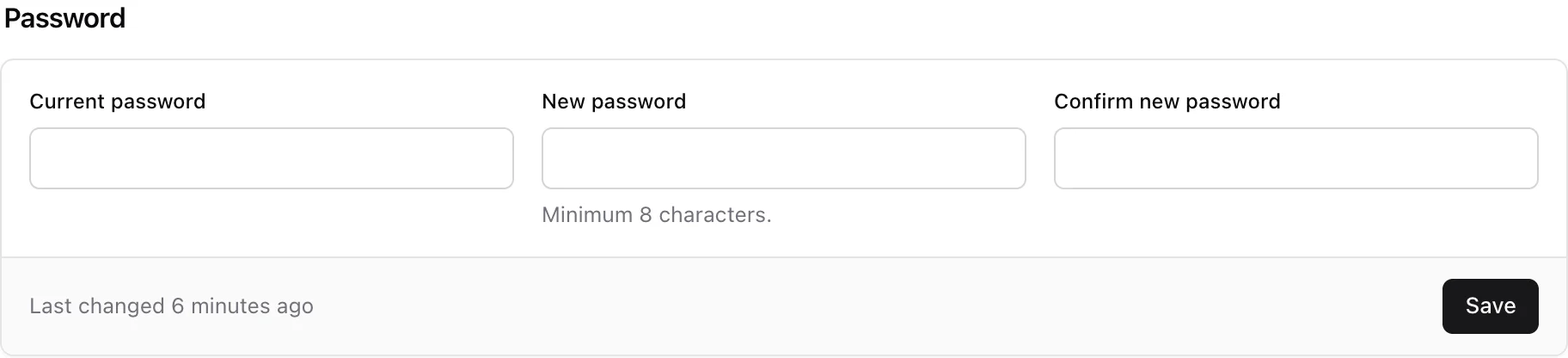
-
Enter the new one
Type it in New password and again in Confirm new password. It needs at least 8 characters.
-
Save
Choose Save.
Monica says Your password is changed. You stay signed in, and the new password is what you type next time. Monica emails you with the subject Your Monica password was changed. Last changed under the form says when you last changed it.
Changing your password does not sign you out on your other devices.
If you forgot the current password, follow Choose a new password when you forgot it instead.
Set a password#
An account created with an outside service or a passkey has no password. The section then says This account has no password. To add one, type it in New password and Confirm new password, at least 8 characters, and choose Set a password.
Monica says Your password is set. and emails you with the subject A password was set on your Monica account.
Remove your password#
A password is the one thing somebody can phish from you. If you sign in with a passkey, or with an outside service, you can do without it.
-
Start
Choose Remove the password.
-
Confirm
Read the warning, then choose Remove the password again. To stop, choose Keep my password.
Monica says Your password is removed. and emails you with the subject Your Monica password was removed. Your passkeys, a connected service, and a link sent to your email address still sign you in. You can set a password again at any time.
The option appears only when your account has another way in. Monica refuses otherwise, for example: Add a passkey first. Removing your password without one would leave nothing but a link sent by email.