
Record where a possession is kept
Things move. A watch goes to the jeweller for a week, a painting leaves the hallway for the study, a box of letters goes into storage while you are away. The Locations section of one of your possessions answers two questions: where is it now, and where has it been?
Chandler and Joey’s foosball table stood in their living room from 1996, went to the storage unit in 2004 when they moved out, and came back to Joey’s new place in 2005. That is three stays: one in the living room, one in the storage unit, and one at Joey’s, which is where the table is now.
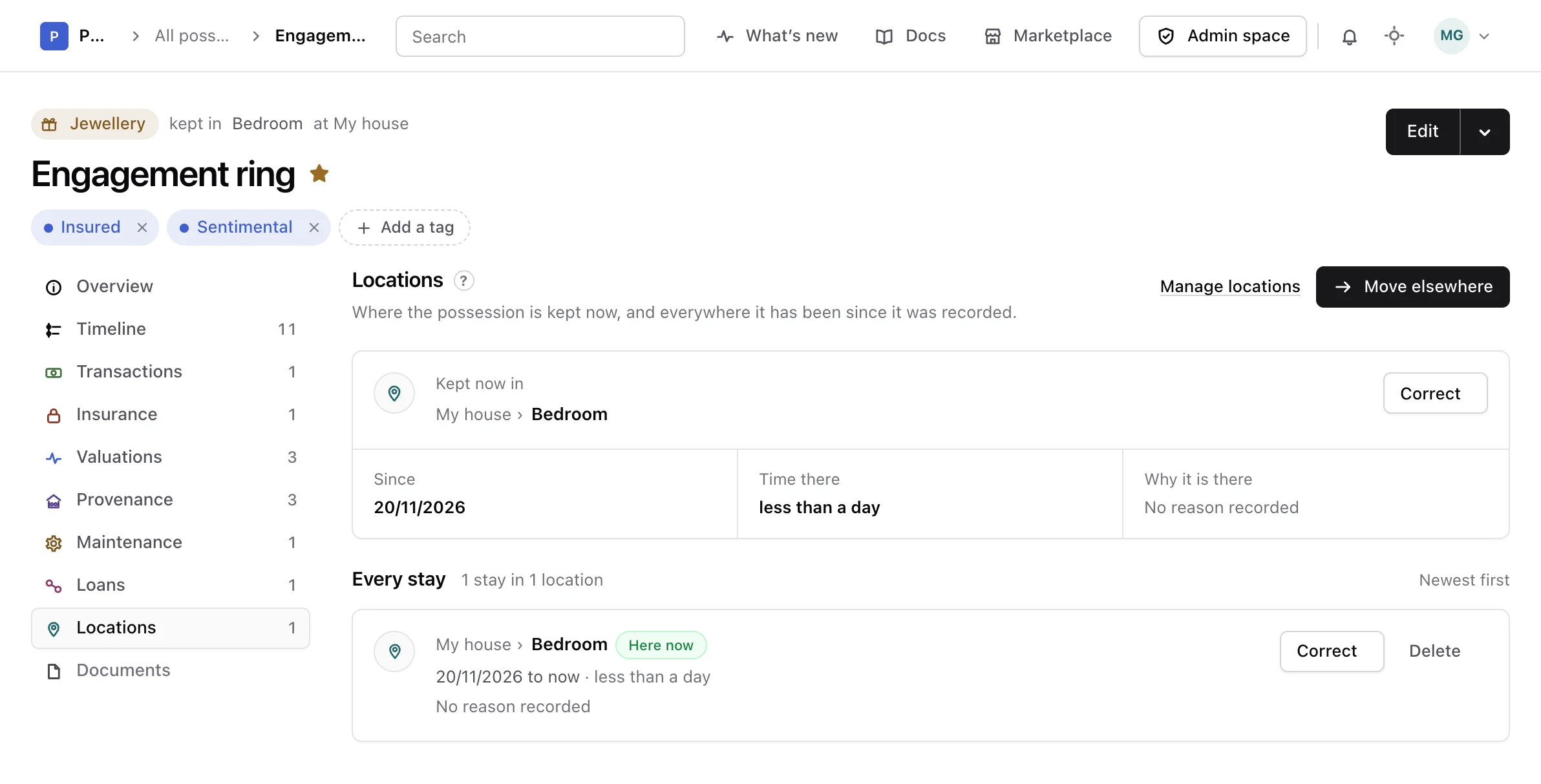
Open a possession and choose Locations in the list of its sections. The number beside it says how many stays it has.
Stays and locations#
A stay is one place and the days the possession spent there. The place is one of your locations, set up once in the settings and shared by every possession. Manage locations at the top of the section opens them.
The stay with no day it left is the open stay: where the possession is now. A possession has at most one. It is also the location shown in All possessions and on the possession’s page, so the two never disagree.
Read where it is and where it has been#
When the possession has an open stay, Kept now in shows the location with the places around it, such as Central Perk › Back room, and the address of the nearest place that has one. Below it, Since gives the day it arrived, Time there how long it has been there, and Why it is there the reason you gave.
When no stay is open, the section says the possession is not kept anywhere right now.
Every stay follows, the newest first, with how many stays there are and in how many locations. Each stay gives its location, its period, how long it lasted, its reason and its note. The open one says Here now. When nothing was recorded between two stays, a line between them says for how long.
Move it elsewhere#
Moving a possession closes the stay where it is now and opens the next one, on the same day.
-
Open the form
In Locations, choose Move elsewhere.
-
Choose where it goes
Pick a location under Move to. Each one is shown with the places it sits inside, so two shelves with the same name are told apart.
-
Say when and why
Moved on starts on today; change it if the move happened earlier. Add a Reason and a Note if they are worth remembering. A line under the form says which stay closes and which one opens.
-
Save the move
Choose Move it.
A move is refused when the possession is already in that location, and when its day comes before the day the open stay began. In that second case, correct the open stay instead.
Choosing a location when you add a possession opens its first stay, on the day you add it. Changing the location on the edit form of the possession is a move dated that day, and clearing it closes the open stay that day.
Correct a stay#
Memory is not always right. Choose Correct on a stay to change its location, the day it arrived, the day it left, its reason or its note. Leave Arrived empty when you do not know the day.
Correcting a stay changes that stay only. The stays before and after it keep their dates, so correct them too if they changed. A past stay always keeps a day it left. The open stay has none: move the possession to close it.
Delete a stay#
Choose Delete on a stay recorded by mistake. Its period then shows as unrecorded, and the location itself stays in your locations. Deleting the open stay leaves the possession with no current location until you move it.
Warning
Deleting a stay cannot be undone.
Choose Delete again to confirm, or Keep it to leave it as it was. Deleting a possession deletes its stays with it.
A location with a history cannot be deleted#
A location that any stay refers to, the current one or a past one, cannot be deleted from your locations, so the history of your possessions is never lost by accident. The settings say how many stays are there. Correct or delete those stays first.
From the API or an assistant#
Stays can also be listed, moved, corrected and deleted through the API reference and by an assistant connected as the MCP guide explains.