
Record what a possession is worth
A valuation says what one of your possessions was worth on a given day, and where that figure comes from: your own estimate, an appraisal, an insurance declaration, an auction result, a comparable listing or an offer you received. The latest valuation by date is what the possession is worth now.
Monica Geller estimated her grandmother’s ring at $1,500 in 2019, from listings of similar rings. In March 2026 a jeweller appraised it at $2,100. She records both, and the appraisal becomes the ring’s current value.
Open a possession and choose Valuations in the list of its sections. The number beside it says how many valuations it holds.
Why valuations are never edited#
Each valuation is kept exactly as you recorded it, so the list shows how the value moved over the years. To correct a figure, record a new valuation rather than changing the old one. A valuation dated before the current one goes into the history, and the current value stays where it is.
Use a valuation whenever somebody puts a figure on the possession. The Declared value you give when you add a possession is what it would cost to replace; once the possession holds a valuation, the valuation takes its place everywhere a current value is shown.
Read what it is worth#
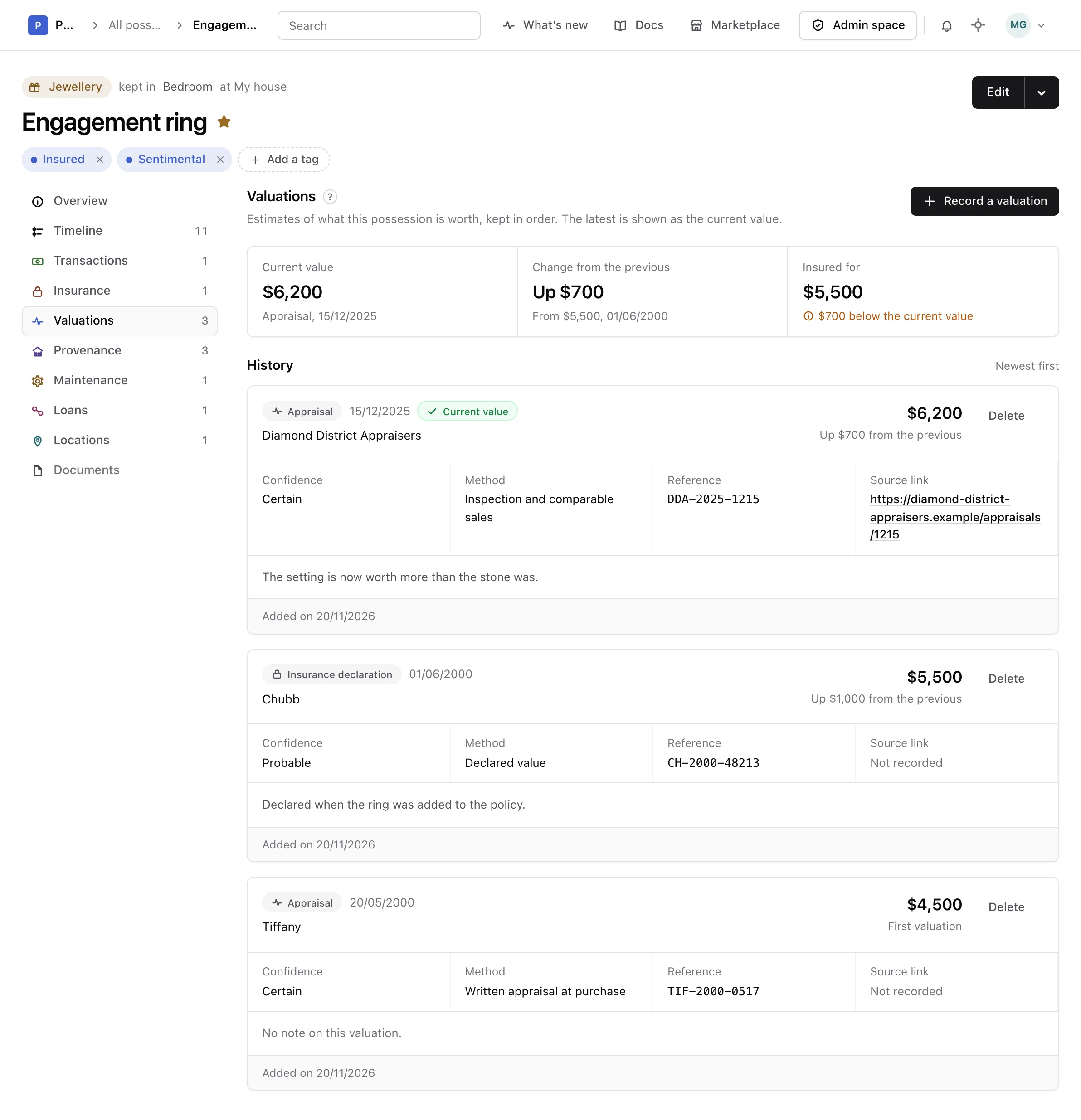
The top of the section reads the value back:
- Current value: the amount of the latest valuation, with its type and date.
- Change from the previous: how much it went up or down since the valuation before it.
- Insured for: what its active insurance record covers. When that is less than the current value, it says by how much.
Two amounts are compared only when they are in the same currency. Nothing is ever converted.
The Overview of the possession shows the same current value, where it comes from and how it moved, with a link to record a new one. The Insurance section compares the insured value with it too.
Record a valuation#
-
Open the form
In Valuations, choose Record a valuation. You can also choose Record a valuation in the menu beside Edit, at the top of the possession.
-
Say where the figure comes from
Pick a Type, the Date the figure applies to, and a Confidence if you know how sure it is: certain, probable or uncertain.
-
Enter the amount
Fill in the Amount and its Currency. A line under them says what the valuation changes: whether it becomes the current value, and by how much it moves it.
-
Save it
Add who gave the figure, how, a reference number, a link where it can be checked, a note, or a certificate or listing if you like, then choose Add valuation.
The type, the date, the amount and its currency are required.
Read the history#
Valuations are listed with the newest first, and the one giving the current value is marked Current value. Each gives its type, its date, who gave it, its amount and how it moved from the one before it, then its confidence, its method, its reference, its source link, its note and the documents attached to it.
Delete one#
Delete a valuation only when it was recorded by mistake, such as one entered twice. Choose Delete, and the warning says what the current value becomes once it is gone.
Warning
Deleting a valuation cannot be undone, and the documents attached to it go with it.
Choose Delete again to confirm, or Keep it to leave it as it was. Deleting a possession deletes its valuations with it.
From the API or an assistant#
Valuations can also be listed, recorded and deleted through the API reference and by an assistant connected as the MCP guide explains.