
Add a person
Write somebody down in a vault, so that you have a page to keep what you know about them.
Say Phoebe has just married Mike Hannigan, and you want him in your Personal vault next to her. You add him once, and his page is ready for his birthday, his phone number and how he knows everybody else.
Before you start#
Open the vault the person belongs in. A contact stays in the vault you add them to, and Monica cannot move them to another vault afterwards. How Monica is organised explains what a vault is for.
Add the person#
-
Open the form
In the vault’s sidebar, choose People, then Add somebody. In a vault that holds nobody yet, the dashboard offers Add the first person instead.
-
Enter the name
Type
Mikein First name andHanniganin Last name. Only the first name is required.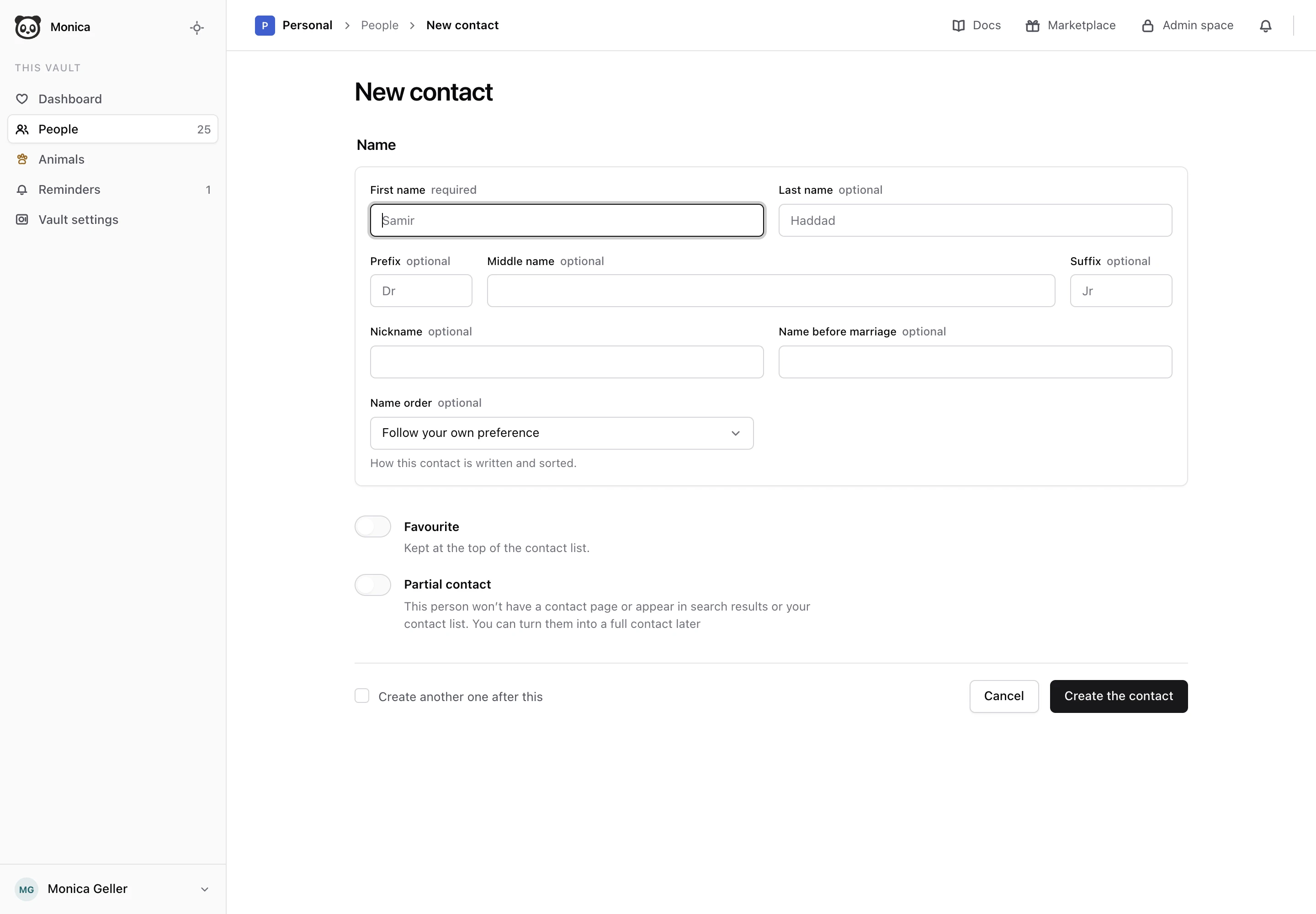
-
Add the rest of the name, if you know it
Fill in Prefix, Middle name, Suffix, Nickname or Name before marriage when they apply. Leave the others empty.
-
Create the contact
Choose Create the contact.
Monica says Mike Hannigan is written down and opens his page. The page is empty, ready for what you know about him. Change what you know about somebody shows how to fill it in.
Choose how the name reads#
Name order decides whether Monica writes the given name or the family name first, and sorts the person in your lists that way. Left on Follow your own preference, the given name comes first. Choose Family name first for somebody whose name is written that way, for example in Japanese or Hungarian. Below the field, Written as shows the name exactly as Monica will write it.
Mark a favourite#
Turn on Favourite for the people you look up most often. Favourites sit at the top of the list of people, under a heading of their own. You can change this later from the star on the person’s photo.
Add a partial contact#
Turn on Partial contact for somebody you want to name without keeping a full record about them, such as the barista at Central Perk whose last name you never learned.
A partial contact:
- has a page, and you can fill it in like any other;
- stays off the Everybody and Favourites lists, and appears only under Partial contacts;
- does not count toward the free plan on monicahq.com.
Most partial contacts are created for you when you link somebody to a person who is not in Monica yet, and leave Create a contact record for this person off. To turn a partial contact into a full one later, open the Relationships tab of the person they are linked to, choose Manage, then Edit on their row, and tick Create a contact record for this person.
Add several people in a row#
Tick Create another one after this before you choose Create the contact. Monica saves the person and opens an empty form again, instead of their page. This is quicker when you are writing down a whole family.
Choose a template#
A template decides which tabs and sections a contact’s page holds. Every vault has a default template for new contacts, and Monica uses it unless you pick another. When your account has more than one contact template, the form shows What this contact starts from, with a Template list to choose from. How Monica is organised explains templates.
If the form refuses#
- The vault has no template. The form says This vault has no template for new contacts to start from. Right after you sign up, Monica is still preparing your templates: wait a moment and open the form again. Otherwise, give the vault a default template in its settings.
- You reached the free plan. On monicahq.com, the free plan holds a set number of contacts across all your vaults. When you reach it, the form says so and Create the contact stays unavailable. Full access lifts the limit. Partial contacts do not count toward it.
After you save#
Monica looks for possible duplicates in the background, for instance a second Mike Hannigan already in the vault. It never merges anybody on its own. To see what it found, open People, then the menu next to Add somebody, and choose Manage duplicates. Review possible duplicates explains the list.
Next steps#
- Fill in what you know about the person.
- Add a photo so you recognise them in the list.