
Record where a possession comes from
The provenance of one of your possessions is its story: where it was made, who has owned it, who held it for a while, and what proves it. Each moment of that story is an event, and the events are read in the order they happened.
Monica Geller keeps her grandmother’s ring. It was made in New York around 1940, her grandmother left it to her mother in 1985, and her mother gave it to her for her wedding in 2001. A jeweller certified it in 2026. That is four events: an origin, an inheritance, a gift and an authentication.
Open a possession and choose Provenance in the list of its sections. The number beside it says how many events it holds.
What belongs here, and what does not#
Provenance records who held the possession and how that is known. It holds no money. When a moment cost something, such as a purchase, record the price as a transaction and link the event to it. The event then shows the transaction’s total, and a price is never typed twice.
Use an event for anything that tells the story: the origin, a purchase, a gift, an inheritance, a sale, a stay with somebody else, a loss and a recovery, a certificate, an exhibition, a mention in a catalogue.
Read the story#
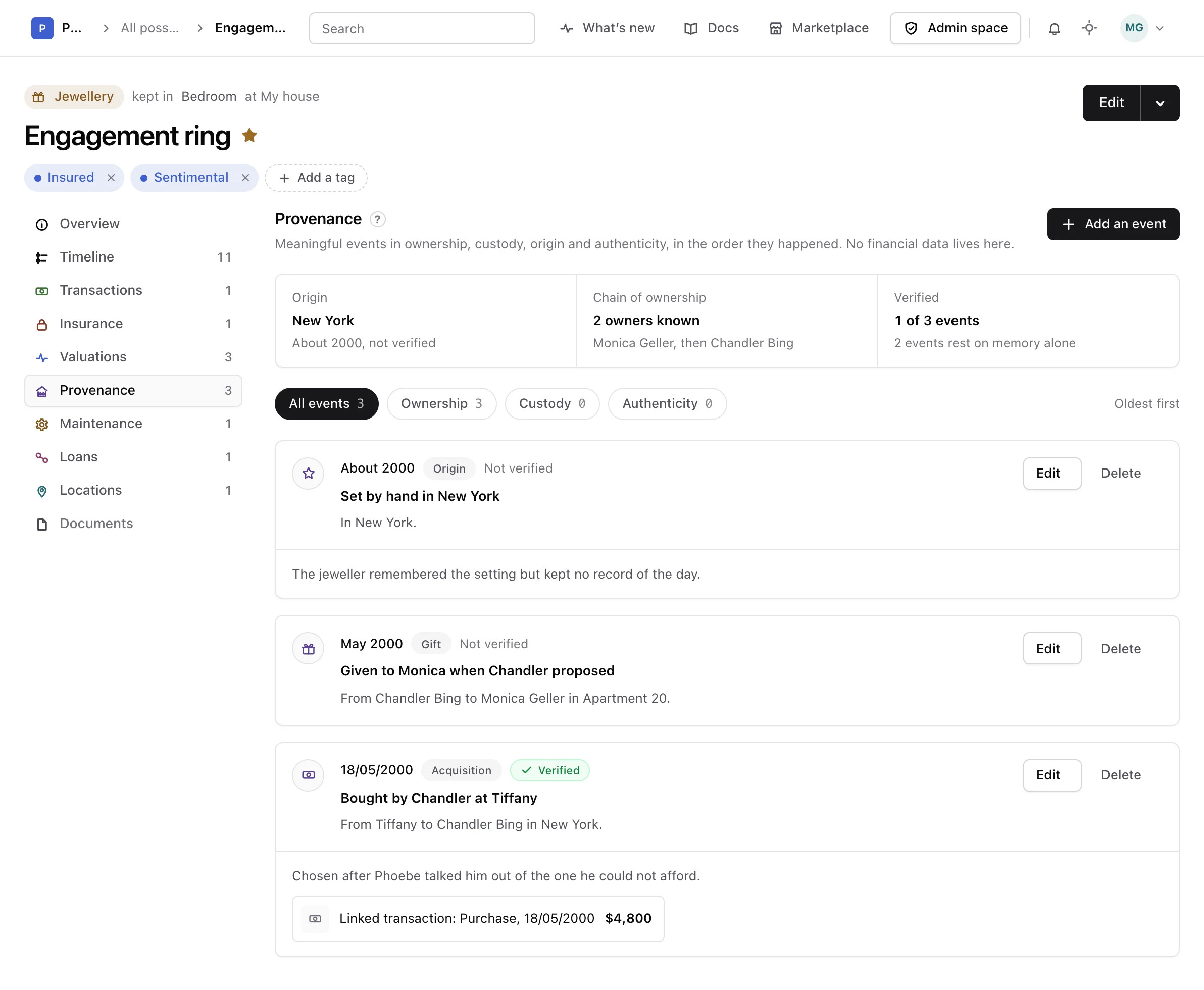
The top of the section sums the events up:
- Origin: where the possession was made, read from its origin event, with its date and whether it is verified.
- Chain of ownership: how many owners are known, named in order. They come from the To of the ownership events.
- Verified: how many events are backed by a record, and how many rest on memory alone.
The events follow, the oldest first. An event whose date is unknown comes last. Each one gives its date, its type, whether it is verified, its title, who it passed from and to and where, and its description, reference and source link when there are some. A linked event also shows its transaction and what it cost; choose it to open Transactions.
Choose All events, Ownership, Custody or Authenticity above the list to see one kind at a time.
Add an event#
-
Open the form
In Provenance, choose Add an event.
-
Say what happened
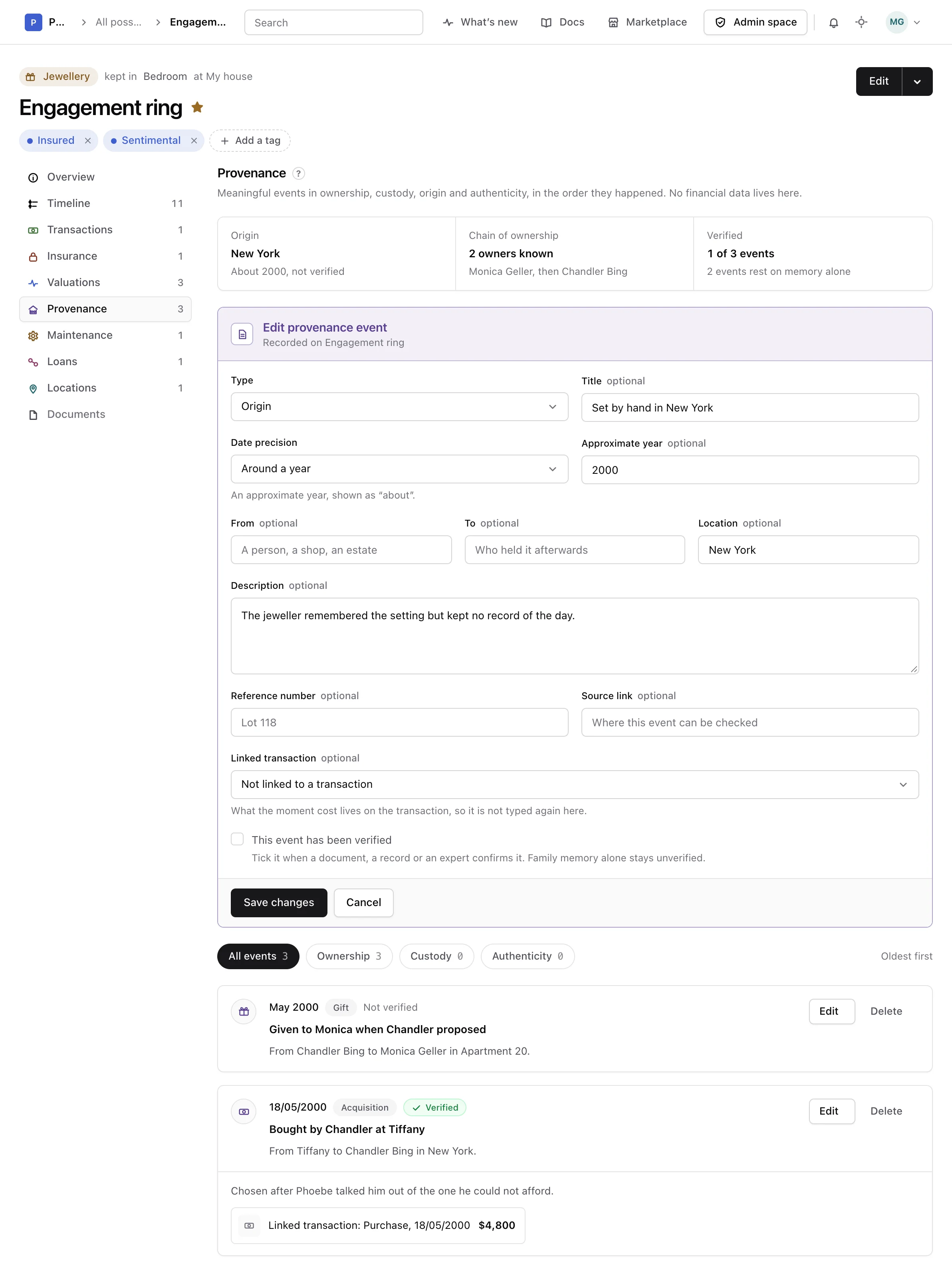
Pick a Type, then give it a Title if you like. Left empty, the event takes the name of its type.
-
Say when, as precisely as you know
Pick a Date precision: an exact date, a month and year, a year, around a year, or unknown. The date field changes to match, and an event around a year reads “About 1940”.
-
Say who and where
Fill in From, To and Location, a description of what happened and how it is known, a reference number and a source link.
-
Link it and save it
Choose a Linked transaction when the moment cost something, tick This event has been verified when a document, a record or an expert confirms it, then choose Add event.
Only the type and the date precision are required. Family memory alone stays unverified: tick the box once a record backs it.
Change or delete an event#
Choose Edit on an event to correct it. It moves to its new place in the list when its date changes.
Choose Delete to remove an event recorded by mistake. The transaction it is linked to stays in Transactions.
Warning
Deleting an event cannot be undone.
Choose Delete again to confirm, or Keep it to leave it as it was. Deleting a transaction keeps the events linked to it, without the link. Deleting a possession deletes its events with it.
From the API or an assistant#
Events can also be listed, recorded, changed and deleted through the API reference and by an assistant connected as the MCP guide explains.