
Link two people
Record how two people are connected, so that each of their pages shows the other.
Say you want to note that Ross is Emma’s parent. You add the relationship once, from either page, and Monica shows it on both: Ross appears as Emma’s parent, and Emma as Ross’s child.
Before you start#
You need at least one of the two people in Monica. The other one can already be there, or you can write them down from the relationship form itself. Add a person explains how to add somebody.
Add a relationship#
-
Open the form
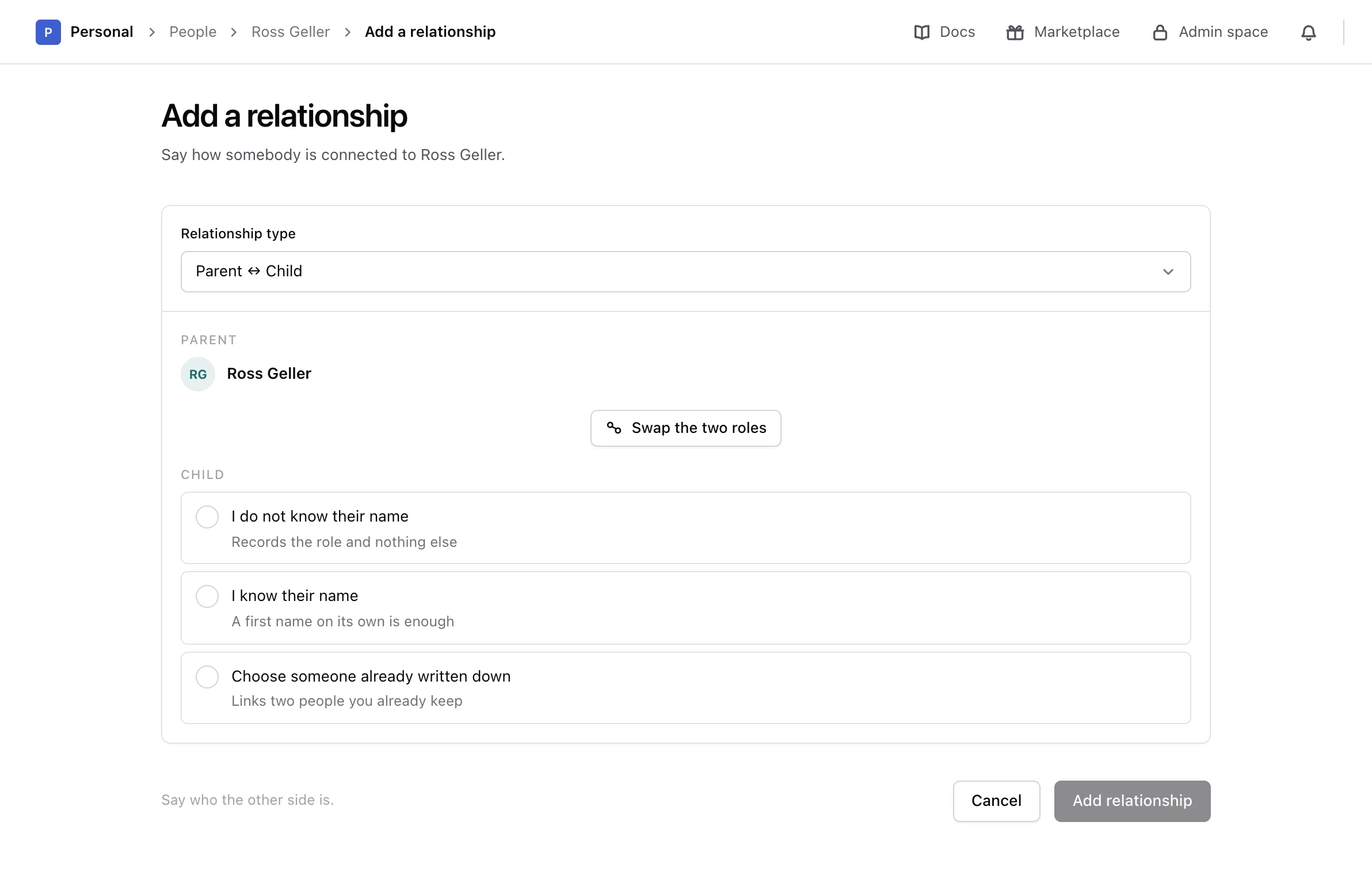
On Ross’s page, choose the Relationships tab, then Add a relationship. On the Overview tab, Add in Immediate family opens the same form.
-
Choose the type
In Relationship type, choose Parent ↔ Child. The types are grouped by kind, such as family, romantic and friendship.
-
Check who holds which role
The form puts Ross in the first role, Parent, and asks who holds the second, Child. If it is the other way round, choose Swap the two roles. Types that read the same from both sides, such as Sibling or Friend, have nothing to swap.
-
Say who the other person is
Choose one of the three options below, then fill in what it asks for.
-
Add the relationship
Read the sentence Monica shows under the form, such as Ross Geller is Emma Geller Green’s parent, then choose Add relationship.
Monica says The relationship is recorded and shows it on the Relationships tab. You do not need to add it again from Emma’s side: one relationship reads from both pages at once.
Three ways to name the other person#
- Choose someone already written down. Search the vault by name and pick the person. Use this whenever the other person is already in Monica.
- I know their name. Type a first name, and a last name if you know it. Monica writes the person down for you.
- I do not know their name. Monica records the role and nothing else, such as "an unnamed parent". Use it when you know that somebody exists but not who they are, for instance Chandler’s grandmother.
With the last two options, the form also offers Create a contact record for this person:
- Ticked, the new person joins your list of people like anybody else.
- Left off, the new person becomes a partial contact. They have a page of their own, but stay out of your list of people, and out of the count of the free plan on monicahq.com. Add a person explains partial contacts.
Family relationships and the family tree#
Parents, children and partners also appear outside the Relationships tab. The Overview tab shows Immediate family, with children and the current partner, and the Relationships tab draws a Family tree of parents, partners and children. Friends, colleagues and other relationships appear in the list only.
If the form refuses#
- There is no relationship type to choose. Your account has no relationship types. Add one in your account settings first.
- Both people have to be in the same vault. A relationship links two people of one vault. Monica cannot link people across vaults.
- Somebody cannot be in a relationship with themselves. You picked the person whose page you are on.
From the API or an assistant#
Everything on this screen can also be done through the API reference and by an assistant connected as the MCP guide explains. Ask it to add Kevin’s wife, or a child whose name you do not know, and it records them as partial contacts unless you ask for a record of their own.
Next steps#
- Record when a relationship ended, or change its type.
- Record something that happened to both people.